

Photon now generates speech with up to 70% lower p95 startup latency than vLLM-Omni. In our Qwen3-TTS tests on H100 and B200, the first audible output arrived in under 85 milliseconds for 95% of requests, at six requests per second. Less waiting for your voice assistant to answer. Faster feedback for the person on the other end.
Today we're adding Qwen3-TTS CustomVoice, in both 0.6B and 1.7B sizes, and Kokoro-82M. Generate a complete recording or stream audio as it's ready, through the same Moondream Python package you use for transcription and vision.
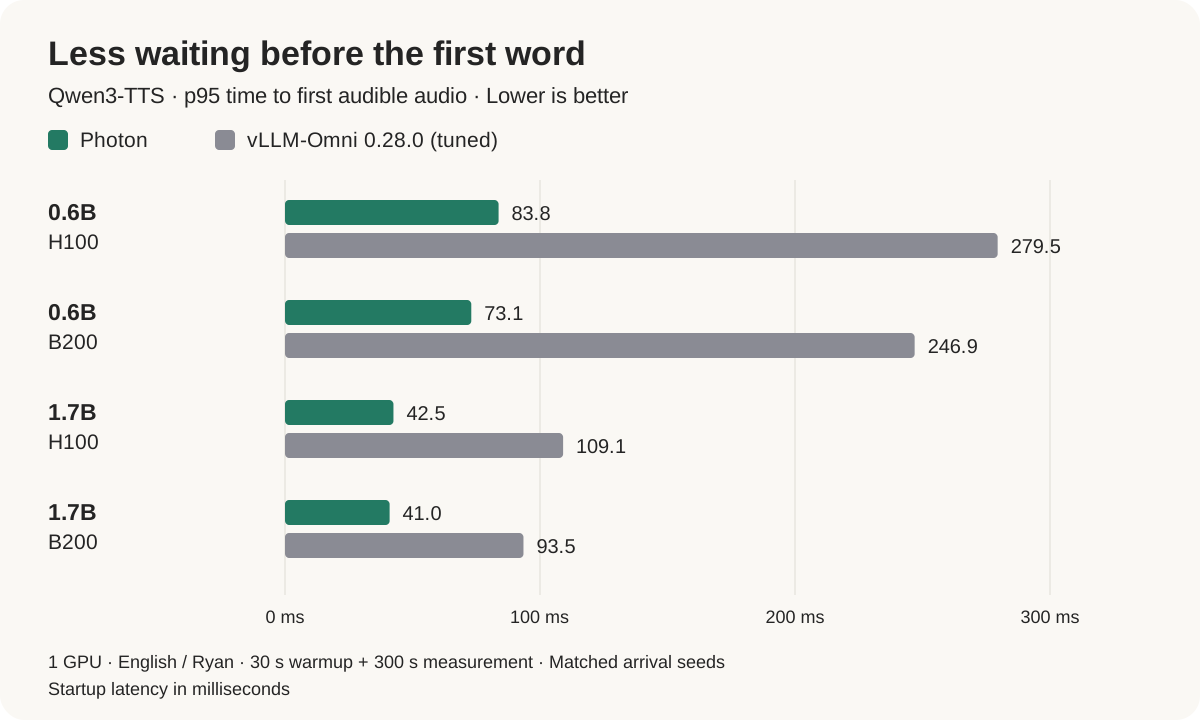
We measure the first audible audio, not a chunk of silence. Photon cut that wait by 56–70% across all four comparisons.
How fast is the complete recording?
Generation speed (RTFx) measures how many seconds of audio a model produces per second of elapsed time. Higher is better: 10× means ten seconds of speech generated in one second.
In our published-release runs, Photon generated speech at roughly 8–10× real time per request, measured by median RTFx while handling six requests per second.
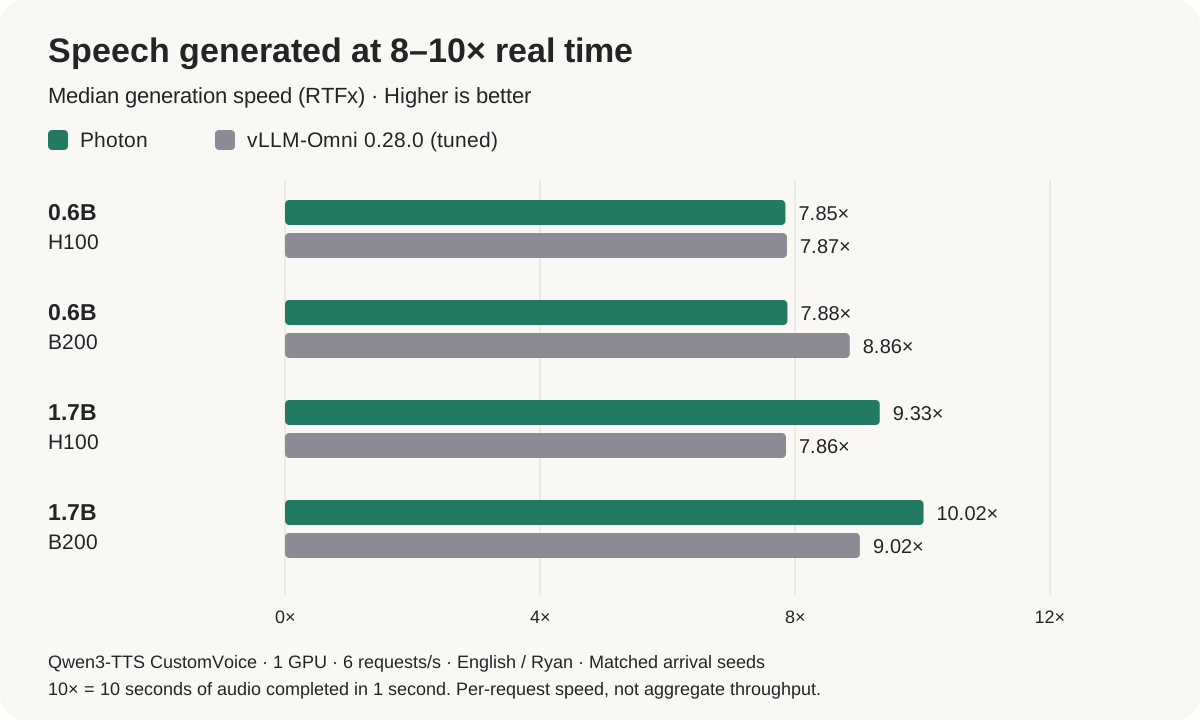
Photon's biggest advantage is getting speech started. For complete recordings, the 1.7B model also has higher median generation speed on both GPUs. The 0.6B model is effectively tied on H100, with vLLM-Omni ahead on B200.
Give it a voice
Install the latest Moondream Python package:
pip install --upgrade "moondream>=2.5.0"Here's a complete Qwen3-TTS example for an NVIDIA GPU:
import moondream as md

with md.photon("Qwen/Qwen3-TTS-12Hz-1.7B-CustomVoice", device="cuda") as voice:
    result = voice.synthesize(
        text="Good morning! What would you like to build today?",
        voice="Ryan",
        language="English",
    )
    pcm = result["audio"]
    sample_rate = result["sample_rate"]
The result is mono, 24 kHz floating-point PCM, ready for your audio output or file writer. Change 1.7B to 0.6B to use the smaller checkpoint. Both accept a voice and language; the 1.7B model also accepts instructions to guide delivery.
To start playback before the whole recording is ready, set stream=True. Each update contains the next piece of audio, not the recording so far. In this example, play is your application's audio output callback:
def speak(voice, text, play):
    stream = voice.synthesize(text=text, voice="Ryan", stream=True)
    for update in stream:
        play(update["audio"], update["sample_rate"])
    return stream.result()
stream.result() returns the complete recording. Async applications can use await voice.asynthesize(...) and consume updates with async for.
A smaller option with Kokoro
Kokoro has 82 million parameters and runs on either CPU or CUDA. It uses the same synthesis methods, with one difference: you pass phonemes instead of text.
Text-to-phoneme conversion decides how written words are pronounced. Keeping that step in your application lets you use your own pronunciation dictionary or language frontend, without installing a separate text-processing stack just to run the model. The input is a Unicode string in Kokoro's phoneme vocabulary, not arbitrary IPA or a list of token IDs.
import moondream as md

with md.photon("hexgrad/Kokoro-82M", device="cpu") as voice:
    result = voice.synthesize(phonemes="həlˈO", voice="af_heart")
    pcm = result["audio"]
Use device="cuda" to run on an NVIDIA GPU. On a Mac, use the CPU path. Kokoro also supports streamed output.
We're excited to see what you build with speech going in both directions. Give it a try, and let us know how it works in your application.